Context
The locators.csv file is the file used by MySurvey Manager to list Scan, UHD, POI and virtual stations being modified in a project. If it does not exist, MySurvey Manager reads a project the same way as MySurvey.
This file alone is authoritative for all stations visible in a project in Manager mode, both existing stations in the project if it has already been published, and stations added via the Manager.
To edit this file, it must be opened in Excel or another spreadsheet application.
Data Format
The locators.csv file is a table with different fields useful for creating a station in columns and stations in rows. A station combining a photo and a scan (co-station) will be displayed in 2 rows, one for the photo and one for the scan.
Some of these fields are meant to be modified, others are only present for information or to create filters in Excel. The latter should not be modified at the risk of corrupting the file.
WARNING: A CSV file, once saved and closed, forgets filtering rules and formulas. Values will be applied permanently and if the table was filtered, rows not displayed by the filter will be lost.
Below is a list of different fields, their usage, editability, and practical Excel formulas to fill them.
| Name | Description | Editable |
|---|---|---|
LOC_ID | Locator ID, it must be unique in the list of locators. It can be edited but it is not recommended. | Limited |
| NAME | The display name of the locator is generally in the format “{EDF.LOCAL}_{EDF.INDEX}” with an index of 3 characters | Yes |
| LOC_STATUS | Current publication status of the locator (PUBLISHED, EXTERNAL, RAW, UNCONVERTED, etc.) | No |
| TYPE | Type of station (SCAN or UHD) | No |
| PATH | Path to the station folder or to the folder containing the source (for unconverted UHDs) | No |
| FILENAME | .loc file representing the station or image file for unconverted UHDs (without the extension) | No |
| EXTENSION | File extension | No |
| LEVEL | Level at which the station is attached | Yes |
| X | Position of the station in X | Yes |
| Y | Position of the station en Y | Yes |
| Z | Position of the station en Z | Yes |
| NORTH_ANGLE | Position of the north on the image in % (Photo only) | Yes |
| LINKED_LOCATOR | ID of the station to which the current station should be attached | Yes |
| COLOR | Station color in HEX | Yes |
| HANDPICKED | True/False indicating whether the station (Photo only) has been positioned with a picking on the plan | Limited |
| PIXEL_X | Position X marked on the plane relative to the pixels of the planes | Limited |
| PIXEL_Y | Position Y peaked on the plane in relation to the pixels of the planes | Limited |
| COMMENT | Free comment area | Yes |
| SURVEY_NAME | Original name of the station | Yes |
| EDF.PALIER | Central platform | Yes |
| EDF.CNPE | Trigram of the plant (BUG, TRI, GRA) | Yes |
| EDF.TRANCHE | Trigram of the slice (TR1) | Yes |
| EDF.BATIMENT | Bi/Trigram of the building (BL, BR, BAN) | Yes |
| EDF.PLANCHER | Numeric format floor | Yes |
| EDF.LOCAL | Area of the station | Yes |
| EDF.INDEX | Station index | Yes |
| EDF.NIVEAU | Floor altimetry | Yes |
| EDF.DED | Dosimetric value of the station | Yes |
| EDF.DATESCAN | Date of acquisition in YYYYMMDD format | Yes |
| SCANNER_MODEL | Model of the scanner used for acquisition | Yes |
| PRODUCER_NAME | Company or individual who made the acquisition | Yes |
Usage
General
To generate the CSV file for a project, press the "Floppy disk" button. This generates the file in the project at Project\\\\DATA\\\\LOCATORS_RAW\\\\locators.csv
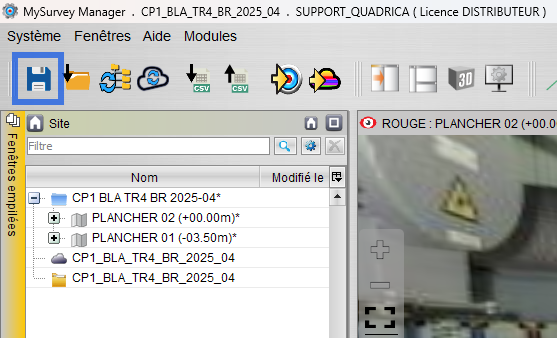
There is no need to close MySurvey Manager to modify the file. The only case where you need to close the locators.csv file is when saving in MySurvey Manager. If the file remains open, MySurvey Manager will not be able to save the project state.
For MySurvey Manager to read the modifications made in the CSV file, press the "Reload SiteStructure" button.
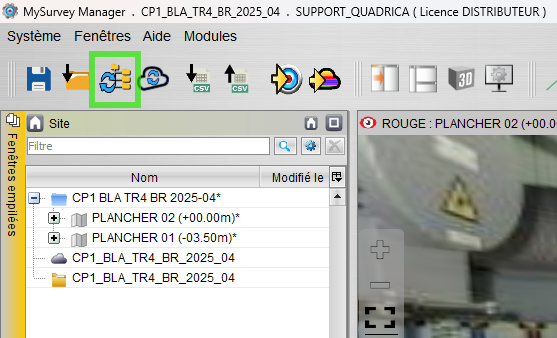
Data Modification
Removing Stations from the Project
It is possible to delete stations from a project by deleting the rows of stations to remove.
Adding Stations to the Project
It is simpler to add stations to a project via MySurvey Manager than via CSV.
Renaming a Station
To rename a station, the NAME field is used. It defines the station's display name. It is generally formatted as:
\\{EDF.LOCAL\\}_\\[EDF.INDEX\\}for scans\\{EDF.LOCAL\\}_\\[EDF.INDEX\\}Pfor photos
where EDF.INDEX is encoded on 3 characters.
Moving a Station to Another Floor
To change the floor to which a station is attached, change the station's LEVEL field to the name of the floor you want to attach it to. If this floor does not already exist in the project, it will be created the next time the locators.csv file is read.
If a floor no longer has any attached stations, it is not automatically deleted. It must be deleted in MySurvey Manager.
Modifying a Photo Station's Orientation
A photo's orientation in the file is expressed in %. This is the north position on the image in % relative to the left edge of the image.
- 50%: center of the image
- 75%: 3rd quarter of the image from the left
- 0% / 100%: left or right edge of the image
Modifying a Station's Position
The X, Y and Z fields represent the station positions. It is possible to change them even for scans, but you must be sure in the case of scans to change all positions to avoid assembly problems.
Modifying Metadata
All important metadata is listed in the file. Simply apply the expected value for each. Doing it via a function is recommended.
Station Co-positioning
The LINKED_LOCATOR field manages Scan/UHD co-positioning. You must put the UHD's ID in the Scan's LINKED_LOCATOR field or vice versa. If MySurvey detects an inconsistency at this level, it will not perform the co-positioning and will inform in the logs of the error:
- If 2 scans point to the same UHD
- If 2 UHDs point to the same scan
- If a station points to an already co-positioned station
This field is temporary. A management with a simpler graphical interface will be available in the future.
Once the modifications are finished, the file can be saved and in the Manager the structure can be reloaded to read the changes made in the "locators.csv" file.
Was this article helpful?
That’s Great!
Thank you for your feedback
Sorry! We couldn't be helpful
Thank you for your feedback
Feedback sent
We appreciate your effort and will try to fix the article